The judging process on FilmFreeway is simple and intuitive. Follow the steps below to add your judges and manage the review process:
Creating Judge Accounts (Sub-Users)
1. Navigate to My Festival > Manage > Manage Users.
2. Click Add User and enter the judge's first and last name and a valid email address.
3. You may use an email that is already linked to an existing FilmFreeway account. The system will associate their new sub-user access accordingly.
4. Assign appropriate roles and site permissions based on what each judge needs to access within your festival account.
5. Once saved, the judge will receive an invitation email with instructions to set up their password.
Judges with multiple accounts (e.g., filmmaker, judge) can switch between accounts via the Account Settings menu (downward arrow in the top-right corner).
Judging & Rating Projects
Judges can access each project’s rating form by selecting the project title from the Submissions page and clicking the Rate Project button near the bottom of the project page.
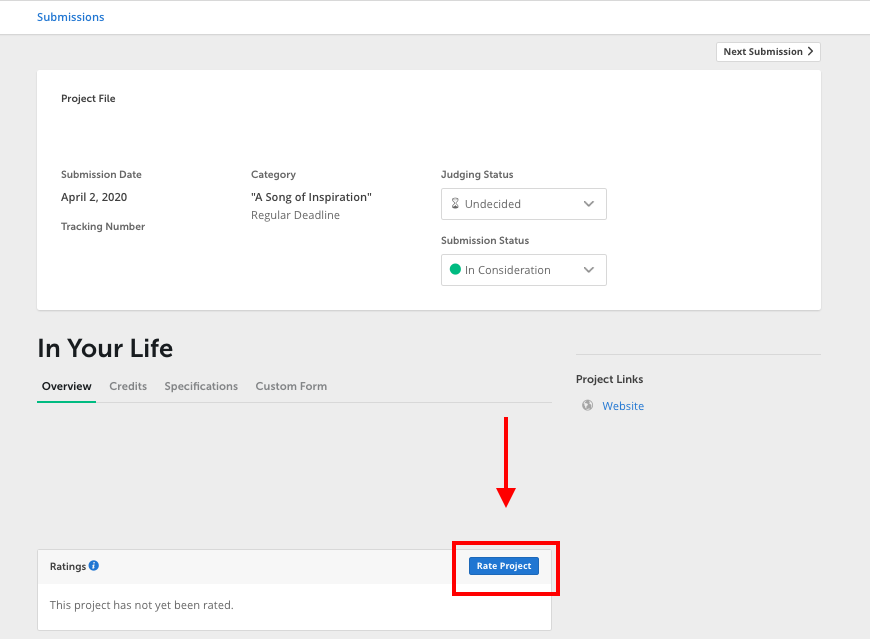
You may create a custom judging form to include specific evaluation criteria by going to My Festival > Manage > Custom Judging Form. This form will automatically appear when judges select Rate Project.
Judges can leave:
- Numeric or qualitative ratings
- Written feedback
- Private notes (not visible to submitters)
All ratings and comments are private by default but can be shared with submitters at your discretion.
Flag System
You may use color-coded flags to help organize selections:
Green = Strong contender
Yellow = Needs further review
Red = Not selected
Flags are visible only to the festival team and judges with proper permissions here.
Assigning Submissions to Judges
There are three options for assigning projects:
- Assign All Submissions
- Assign by Category
- Assign Specific Submissions to Specific Judges
To assign projects:
1. Go to My Festival > Manage > Manage Users and select the relevant permissions under “Judging”.
2. If assigning specific submissions, use the Submissions page or visit an individual Project Details page.
3. Use the Assign to Judges dropdown (person icon in the submissions table) or the Bulk Actions tool to assign multiple submissions at once.
Judge Guide – Rating Projects
Judges should begin by confirming they are logged into the correct account. If a judge has multiple accounts (e.g., as a filmmaker and a judge), they can switch between accounts via the Account Settings menu (downward arrow in the top-right corner).
To rate a project:
1. Go to the Submissions page and click on the project title.
2. On the project page, scroll down and click Rate Project.
3. Complete the judging form and click the green Create Rating button to save your response.
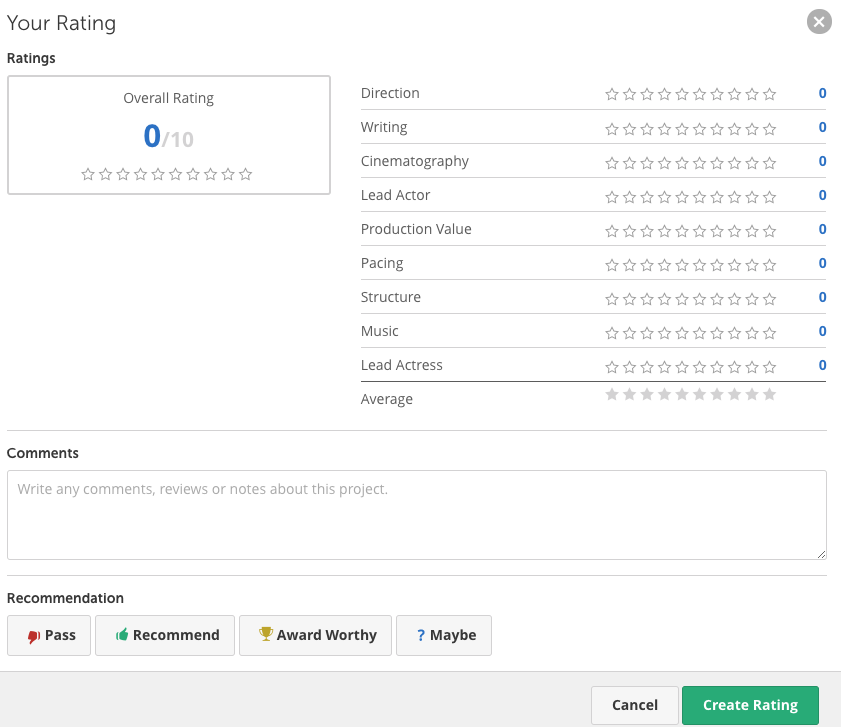
4. Ratings and comments can be edited at any time.
Judges’ ratings are automatically visible to the festival team and contribute to the overall evaluation process.
Monitoring Judge Activity
Use the Judging Insights tool to:
- View judge progress across all submissions
- Export judging data in spreadsheet format
- Send reminder emails to judges
Access Judging Insights here: https://filmfreeway.com/festivals/judges
